
Key Takeaways
- Portainer Business, Talos Linux, and Omni provide a certified path for deploying Critical Manufacturing MESv11.3 on Kubernetes without requiring a dedicated platform engineering team.
- Talos Linux runs as an immutable, API-only operating system with no SSH and no shell, Omni manages cluster lifecycle as an integrated Portainer capability, and Portainer Business serves as the single interface for provisioning, RBAC, GitOps, and day-2 operations
- The deployment follows seven steps, from installing Portainer Business through configuring governance and deploying MES via DevOps Center, resulting in a production-grade environment that existing IT and OT staff can operate directly
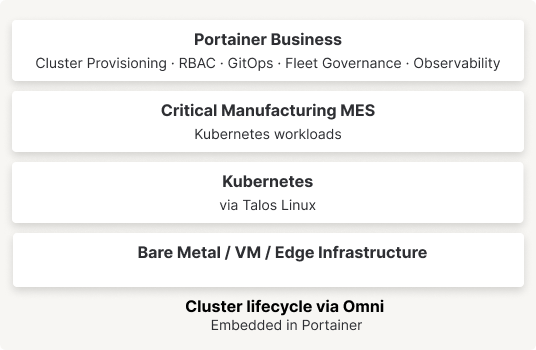
This guide walks through deploying Critical Manufacturing MES on a Kubernetes cluster provisioned and governed entirely through Portainer Business. Portainer serves as the single operator interface across the full stack, with Talos Linux providing an immutable, SSH-free OS layer and Omni handling cluster bootstrapping as an integrated capability within Portainer.
The end result is a production-grade MES deployment that is governed, auditable, and operable by IT generalists without requiring deep Kubernetes expertise.
The Stack
Talos Linux is an immutable, API-driven operating system built for Kubernetes nodes. It has no SSH access, no package manager, and no shell. All configuration flows through its API. This eliminates an entire class of OS-level drift and security exposure, making it well-suited for factory and regulated environments.
Omni (by Siderolabs) is the control plane for Talos cluster lifecycle: machine registration, bootstrapping, patching, and version upgrades. In this stack it operates as an integrated backend within Portainer rather than a standalone tool operators interact with directly.
Portainer Business is the operator control plane that sits above Kubernetes. It handles cluster provisioning (via the Omni integration), application deployment, RBAC, GitOps, fleet governance, and observability, all from one UI.
Critical Manufacturing MES is a containerized, modular manufacturing execution system deployable on Kubernetes. Its components are managed through Portainer using Helm charts and GitOps.
Architecture
Step 1: Install Portainer Business
Deploy Portainer Business on your management node or an existing Kubernetes cluster using the official Helm chart. Access the UI on port 9443 and apply your Business license on first login.
Full installation instructions
Step 2: Connect Omni to Portainer
Before provisioning any cluster, add your Omni service account credentials to Portainer. In the Portainer UI go to Settings → Credentials → Add credentials and select Sidero Omni. Provide your Omni endpoint URL and service account key.
Once saved, Portainer can see all machines registered in your Omni instance and provision Talos clusters directly from the UI.
Step 3: Install Talos on Your Machines
Before a cluster can be provisioned, each node needs to be booted into Talos Linux. Omni generates a machine-specific ISO (or iPXE script for PXE environments) that embeds a unique join token tied to your Omni instance. To get it, log into the Omni dashboard, navigate to Download Installation Media, select your Talos version and architecture, and download the ISO.
Boot each physical or virtual machine from the downloaded ISO. On first boot, Talos starts in maintenance mode and the node automatically registers itself with your Omni instance using the embedded token. Within moments it appears in the Omni machine list (and in Portainer, once credentials are connected) as an unallocated node, ready to be assigned to a cluster.
No further OS configuration is needed at this stage. Talos intentionally has no interactive shell or SSH access, everything from this point forward is driven through the API.
Step 4: Provision the Talos Cluster
From the Portainer menu, expand Environment-related, click Environments, then Add environment. Select Create a Kubernetes cluster, click Start wizard, and ensure Talos Kubernetes is selected.
If no Omni credentials have been configured yet, Portainer will prompt you to add them now. Enter a name for the credential set, your Omni endpoint URL, and your service account key. Once saved, you can reuse them across future clusters.
The cluster configuration form is broken into a few sections. Under Portainer server details, confirm the API server URL and tunnel server address that the Edge Agent on the new cluster will use to “phone home”, these are typically pre-populated. Under Omni cluster summary, select your credentials and choose the Talos and Kubernetes versions to deploy. Under Cluster machines, assign nodes from your registered pool to the control plane (an odd number is recommended) and the worker pool.
Click Provision environment to start. Portainer provisions the cluster through Omni and automatically deploys the Portainer Edge Agent to it. Progress is tracked on the Environments page, hover over the status for detail if an error occurs. Once complete, the cluster is accessible as a standard Portainer environment.
Step 5: Configure Governance
Before deploying MES workloads, configure access controls in Portainer under Environments → [MES Cluster] → Access. Assign your platform admin team as Environment Administrator, OT operators as Operator scoped to the mes-production namespace, and plant technicians as Helpdesk (read-only). Portainer propagates these role bindings without touching Kubernetes RBAC directly.
For multi-site deployments, apply a Fleet Governance Policy under Fleet → Governance Policies to enforce namespace existence, resource quotas, and registry restrictions consistently across all MES clusters.
Step 6: Deploy Critical Manufacturing MES
Critical Manufacturing MES is deployed through DevOps Center, CM's deployment portal integrated into their Customer Portal. DevOps Center is used directly to deploy and upgrade MES instances into the Kubernetes environments prepared in the previous steps — handling the full installation from a central location, whether on-premises, cloud, or hybrid.
Once the deployment packages are available in your environment, the Kubernetes-specific setup can be managed through Portainer. Create the mes-production namespace in the cluster and, before deploying, ensure a suitable storage class is in place to back the persistent volumes MES requires — primarily database storage and file-based runtime data. On bare metal Talos nodes a distributed storage solution such as Longhorn or Rook-Ceph is recommended, as it provides the redundancy and performance that production MES workloads demand.
Critical Manufacturing deployment overview
Step 7: Day-2 Operations
All ongoing operations run through Portainer. Pod health, logs, resource pressure, and Kubernetes events are visible under the environment's Workloads and Cluster views. MES version upgrades are handled through a Git commit that Portainer detects and rolls out automatically.
For Talos and Kubernetes version upgrades, navigate to [MES Environment] → Cluster → Details where Portainer surfaces the current Talos and Kubernetes versions and provides an upgrade workflow. Portainer coordinates a rolling node upgrade through Omni, keeping MES workloads available throughout.
Conclusion
These seven steps guide you through deploying Critical Manufacturing MES on a Kubernetes cluster provisioned and governed entirely through Portainer Business without requiring a dedicated Kubernetes platform team. Portainer Business, Talos Linux, and Omni handle cluster provisioning, governance, and day-2 operations from one interface, so you existing IT and OT staff who already run your plant floor can run this stack too.
If your team is planning this move, whether replacing a legacy Windows install or evaluating platform options for a new site, the next step is a conversation with your Critical Manufacturing account team. They can bring in a Portainer solutions engineer to size the deployment against your environment.